Today is a big day for us.
FoundHint 0.1.0, our first public release, is now available on the official WordPress Plugin Directory.
FoundHint is a WordPress plugin built only for local SEO. It helps local customers find you, trust you, and visit you.
You can manage your business information, locations, services, schema, audits, and Google Business Profile reviews from one dashboard.
Why We Built FoundHint Plugin?
Most WordPress SEO plugins cover general website SEO. Local SEO needs more than an address in the footer. While talking to business owners and agencies, we kept hearing the same problems:
- “My website and Google listing show different hours or phone numbers.”
- “I type the same address and hours on every page.”
- “I added schema, but I’m not sure it’s right, or whether it’s duplicated.”
- “Managing many locations is a mess.”
- “I keep switching between WordPress and Google just to reply to reviews.”
Local SEO works when your business details are complete and consistent everywhere. That includes your website, your schema, and your Google Business Profile.
FoundHint gives you one trusted source for that data and follows a simple structure:
Business → Locations → Services
You enter your details once. FoundHint then reuses them in your schema, your audit, and your Google Business Profile.
What’s Included in Version 0.1.0?
Google My Business Information, All in One Place
Store your business details in one place:
- Name, type, and categories
- Description, with a version history
- Phone numbers, email, and website
- Opening date and price range
- Social profiles
- Booking and WhatsApp links
- Logo, cover photo, and gallery photos
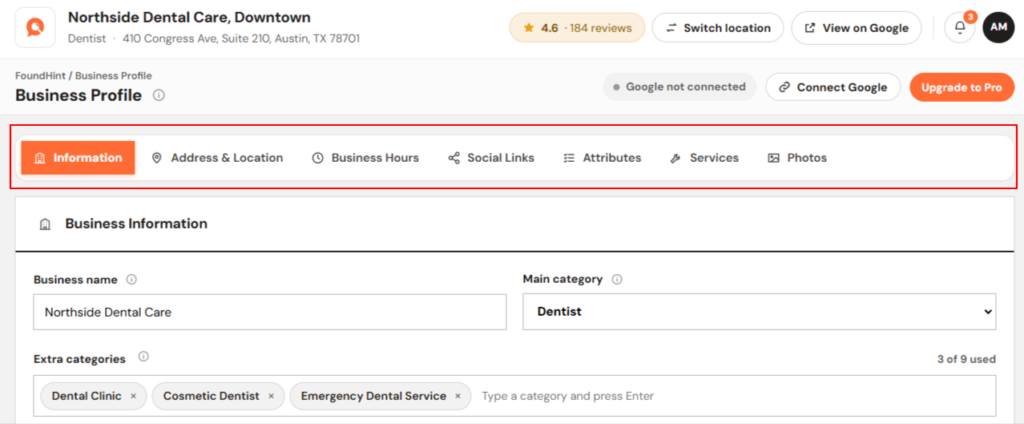
You can search Google’s own category list to set your primary and secondary categories accurately.
Multiple Locations, Free
You can run every branch from one WordPress site at no cost. Each location has its own:
- Address and map position
- Phone number
- Opening hours
- Services and service area
- Photos, attributes, and reviews
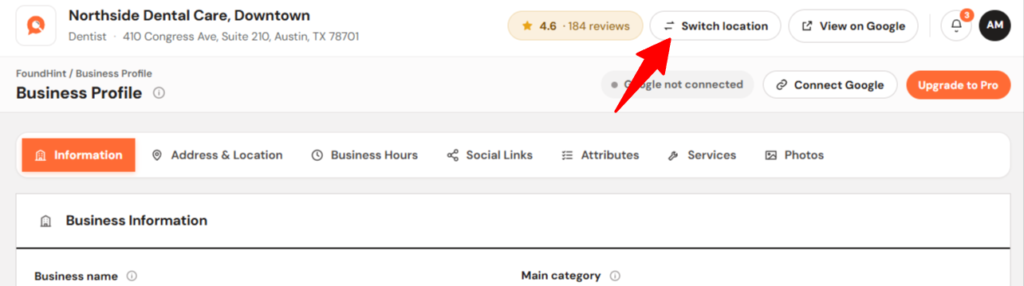
A location switcher at the top of every screen lets you move between locations quickly.
Flexible Opening Hours
You can mark each day as Open, Closed, or Open 24 Hours. Split hours, such as a lunch break, are supported. You can also add special hours for holidays and one-off dates.
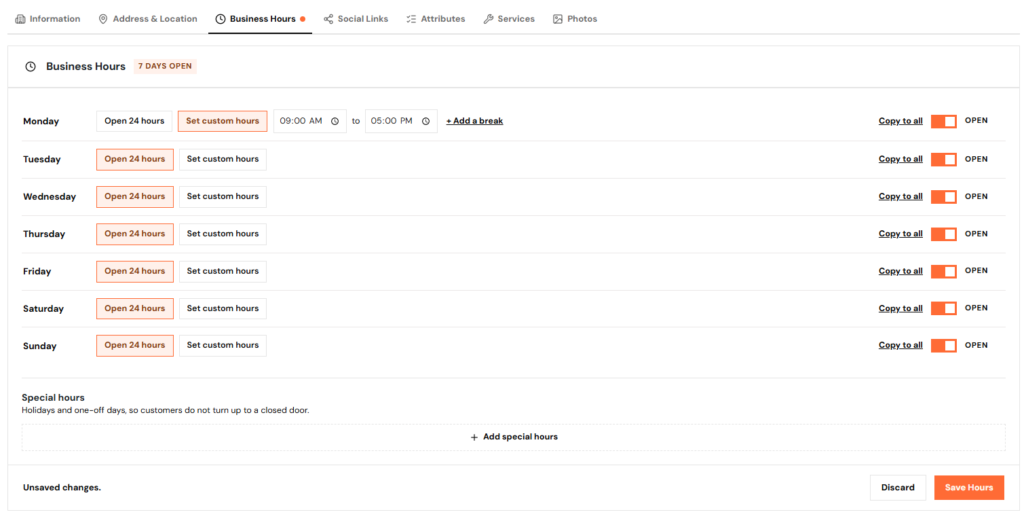
Hours are stored in a structured format, so they work cleanly in schema and on Google.
Service Management
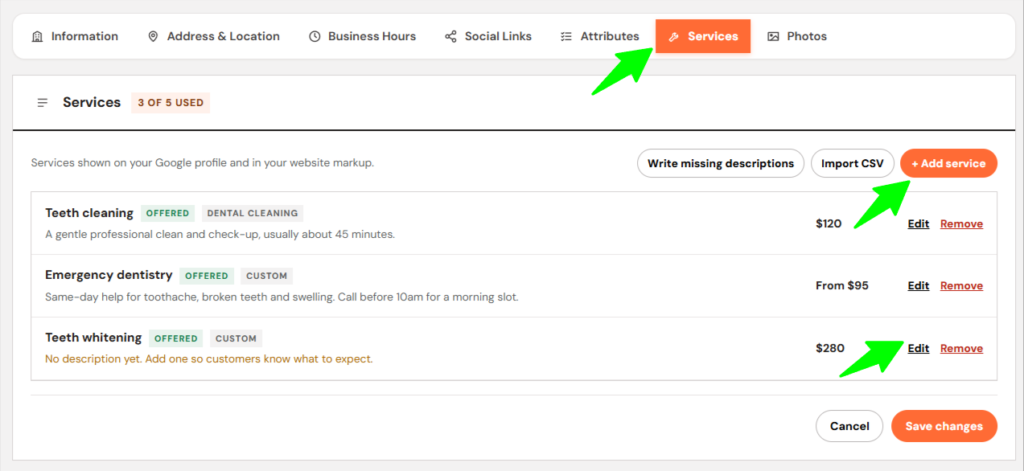
For each service, you can add:
- A description
- A price and currency
- A URL and a status
- A matching ready-made service from Google’s list for your category
LocalBusiness Schema, No Coding
FoundHint creates accurate JSON-LD structured data for every location. It uses your saved details: business subtype, address, coordinates, hours, services, contact information, social profiles, and areas served. There is no separate schema data to keep up to date.
No Duplicate Schema
Already using another SEO plugin? FoundHint detects Yoast SEO, Rank Math, All in One SEO, and SEOPress. If one of them already outputs LocalBusiness schema, FoundHint can stand aside so your pages never carry duplicate markup.
You can override this choice on the Schema screen. FoundHint never changes or disables another plugin’s settings.
Local SEO Audit and Health Score (Advance Audit Coming Soon)
You can run an audit from your dashboard. It checks:
- Your business information
- Your locations
- Your opening hours
- Your structured data
- Website signals such as HTTPS
- Whether your Google Business Profile matches your website
Each issue is sorted by severity: Critical, High, Medium, Low, or Passed. Each one comes with a plain-language explanation. A single Health Score tracks your progress over time.
A Safe Way to Fix Problems
Fixes follow a simple workflow: Detect → Explain → Apply → Recheck.
A one-click fix appears only when the correct value is already known. FoundHint doesn’t guess. A fix is applied only when you press its button, and the audit then runs again so you can see the result immediately.
Google Business Profile Connection, No API Keys
You connect your Google account with one button. You don’t need a Google Cloud project, client ID, or API key. FoundHint finds the Business Profile locations your account manages and links each one to its own FoundHint location.
Once connected, you can:
- Compare Website Data and Google Data side by side. This covers name, description, phone, address, hours, categories, services, and links.
- Import from Google with a guided import. Refreshing from Google only fills empty fields, so nothing you set is overwritten.
- Send updates to Google. This covers business info, hours, special hours, categories, services, service area, attributes, links, and photos. You review the changes before they are sent.
Reviews and Replies in WordPress
You can see each location’s average rating, every review, and which reviews are still waiting for a reply. You can post, edit, or delete replies without leaving WordPress.
Your Data Stays Yours
We designed FoundHint with privacy in mind:
- Your business data never passes through our servers. Our sign-in service, FoundHint Connect, only helps with Google authentication. After that, your site talks to Google directly.
- Your Google tokens are encrypted in your own database. Disconnecting removes them and asks Google to revoke access.
- You can bypass our sign-in service entirely. If you prefer, you can use your own Google Cloud client under Advanced settings.
- Nothing is deleted on uninstall unless you choose that option. Google credentials are always removed for safety.
Works with Your Existing Setup
FoundHint doesn’t replace your current SEO workflow. It works alongside:
- Gutenberg and the Classic Editor
- Yoast SEO, Rank Math, All in One SEO, and SEOPress
- WooCommerce
- Common WordPress themes
Requirements:
- WordPress 6.4 or higher
- PHP 7.4 or higher
- Tested up to WordPress 7.1.3
Who Is FoundHint For?
FoundHint is for any business that depends on local customers, including:
- Small businesses and service-area businesses
- Restaurants and retail stores
- Clinics and dental practices
- Salons and hotels
- Automotive and real estate businesses
- Schools and other educational institutions
- Franchises and other multi-location brands
It’s also built for local SEO and digital marketing agencies that manage many clients.
Get Started in 2 Minutes
- Go to Plugins → Add New in your WordPress dashboard, search for “FoundHint,” then install and activate it.
- Open FoundHint in the admin menu and click Get started.
- Click Continue with Google and approve access with the account that manages your Business Profile.
- Choose your listing, import your details, and review them on the Business screen.
- Run your first SEO audit to see what needs fixing.
What’s Coming Next?
Version 0.1.0 is only the beginning. Here’s what’s on our roadmap:
- Location landing pages and templates, built from data you’ve already saved
- Front-end blocks to show your hours, details, and map on any page
- Google Business Profile posts, with scheduling, a calendar, and multi-location publishing
- A Local Ranking Grid to see how you rank across your whole service area, plus competitor analysis and ranking history
- A performance dashboard and prioritized recommendations to turn your audit findings into clear next steps
- Advanced schema and a deeper audit
Help Us Shape FoundHint
As a first release, your feedback matters a lot to us. If FoundHint helps your business, please leave a review on WordPress.org. Reviews help other business owners find the plugin.
Found a bug or have a feature idea? You can reach us on the support forum. You can also help translate FoundHint into your language.