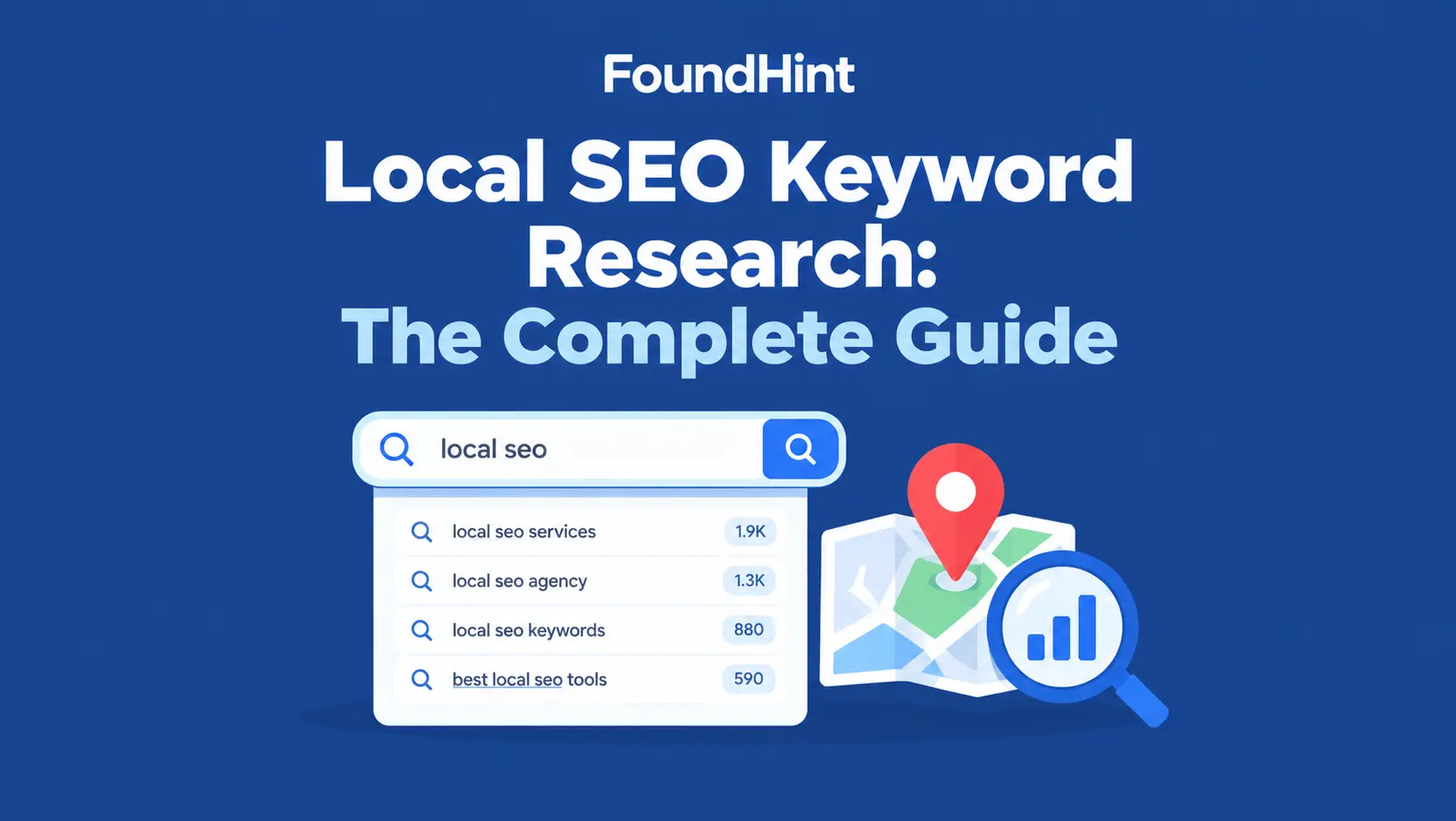
Every local business has a customer who just typed something into Google: “emergency plumber Dallas,” “dentist near me open Saturday,” “how much does roof repair cost.”
If your website and Google Business Profile don’t speak that same language, that customer finds someone else.
Local SEO keyword research is how you learn that language. It shows you which services people search for, which cities and neighborhoods they add to their searches, and what they actually want when they search.
Get it right and every service page, location page, and Business Profile update has a clear purpose. Get it wrong and you end up ranking for searches that never turn into calls.
This guide walks through keyword research for local SEO from start to finish: what local keywords are, the different types, a step-by-step process, how to find location-based keywords, the best keyword research tools for local SEO (free and paid), industry examples for plumbers, contractors, roofers, dentists, and more, how to map keywords to pages, advanced strategies, and a checklist you can reuse for every local SEO campaign.
 FoundHint Local SEO WordPress
Optimize your Google Business Profile without leaving WordPress
Connect your profile, compare it with your website and fix the gaps FoundHint finds.
- Business Profile audit and optimization
- Google Post scheduling
- Review management and replies
- Local rank tracking on a map grid
What Is Local SEO Keyword Research?
Local SEO keyword research is the process of finding the searches people use to find nearby businesses, services, products, and providers, and then deciding which of those searches your business should target and on which pages.
How it differs from traditional keyword research?
Traditional keyword research looks for the biggest national or global opportunities. Local keyword research focuses on a specific local market. A keyword with 90 monthly searches in Tampa can be worth more to a Tampa roofer than one with 50,000 searches nationwide, because every one of those 90 searchers is a potential customer.
Why location and search intent matter?
The same words mean different things in different contexts. “Roof repair” searched from a phone in Tampa during hurricane season has strong local, urgent intent. Google shows Local Pack results and nearby businesses.
“Roof repair cost” has informational intent and shows articles. Local keyword research is as much about understanding local search intent as finding words.
Examples of local keywords:
- plumber Dallas
- dentist in Austin
- roof repair near me
- emergency HVAC repair Phoenix
- best tacos in East Austin
- how much does a kitchen remodel cost in Denver
- locksmith 75206 (ZIP code)
- urgent care near Southpark Meadows (landmark)
Where local keywords show up in Google?
A single local search can return three different result zones, and each one ranks businesses differently:
| Result zone | What appears | What drives ranking |
|---|---|---|
| Local Services Ads / Google Ads | Paid listings at the top | Ad budget, bids, Google screening (for LSAs), reviews |
| Local Pack (map results) | Three businesses with a map, from Google Business Profiles | Relevance, distance, and prominence: your Business Profile, proximity to the searcher, reviews |
| Organic results | Websites, directories, articles | On-page SEO, content quality, links |
That’s why local keyword research has to serve both your website and your Google Business Profile. The keyword “emergency plumber Dallas” might be won in the map pack by your Business Profile and in organic results by your emergency plumbing page.
Businesses that appear in more than one zone at once (ads, map, and organic) own more of the search results page and tend to win more local customers.
Why Is Keyword Research Important for Local SEO?
How important is keyword research for local SEO? It’s the foundation everything else is built on. Keyword research helps you:
- Understand what potential customers search for: in their words, not your industry jargon (“AC not working,” not “HVAC system diagnostics”)
- Identify high-intent service keywords: the searches most likely to turn into calls and bookings
- Discover location-specific search opportunities: cities, suburbs, and neighborhoods with real demand
- Plan useful service and location pages: so each page has a clear job
- Improve website content relevance: headings, title tags, meta descriptions, and copy that match real searches
- Support Google Business Profile optimization: choose the right categories, services, and post topics (Google Business Profile Categories)
Types of Local SEO Keywords
| Keyword type | Example | What the searcher usually wants |
|---|---|---|
| Service keywords | plumber, roof repair | A provider (often with implied local intent) |
| Location keywords | plumber in Dallas | A provider in a specific city |
| Near-me keywords | dentist near me | The closest relevant business, right now |
| Transactional keywords | emergency plumber Dallas | To hire or book immediately |
| Informational keywords | how much does roof repair cost | Answers, pricing, advice before hiring |
| Industry-specific keywords | tankless water heater installation, dental implants | A specialized service |
| Branded and competitor-related searches | ABC Plumbing reviews, ABC Plumbing vs XYZ | Information about specific businesses |
| Long-tail local keywords | 24 hour emergency plumber in North Dallas | A very specific need, often with high intent |
Explicit vs. implicit local keywords
One of the most important ideas in local keyword research is the difference between explicit and implicit local searches:
- Explicit local keywords name a place: “locksmith in Dallas,” “dentist Austin TX,” “plumber 75206.”
- Implicit local keywords name no place at all: “locksmith,” “dentist,” “coffee shop.” Google still treats them as local and uses the searcher’s device location to show nearby businesses.
This matters for three reasons:
- Many of your best keywords won’t contain a city name. Someone searching “water heater repair” from their phone in Dallas sees a local pack, even though they never typed “Dallas.” Tools often show these implicit terms with much higher volume than the city versions.
- You can rank for implicit keywords without stuffing city names into every page, as long as your Google Business Profile, address, location pages, and reviews clearly connect you to the area.
- Rankings for implicit keywords change with the searcher’s location. You might rank #1 for “plumber” two blocks from your shop and #12 five miles away. That’s normal, and it’s why local rank tracking needs to check multiple points on a map, not just one.
Are “near me” keywords still worth targeting?
“Near me” searches are really implicit searches with an extra phrase. Google already uses the searcher’s location, so you don’t need to write “near me” into your titles, headings, or content. Repeating it doesn’t help and reads awkwardly. What helps is being clearly relevant for the service and clearly connected to the area. Track a “near me” keyword if it has strong volume in your niche, but don’t build pages around it.
How to Do Keyword Research for Local SEO?
How do you do keyword research for local SEO? Follow these nine local SEO keyword research steps. We’ll use a fictional company, Lone Star Plumbing in Dallas, as the running example.
Step 1. Identify Your Services and Products
List everything the business actually offers, plus the business categories and the customer problems behind them.
- Services: drain cleaning, water heater repair, water heater installation, leak detection, repiping, sewer line repair
- Categories: plumber, drainage service, water heater installation service
- Customer problems: clogged drain, no hot water, burst pipe, low water pressure, sewer smell
Customer problems matter because people often search the problem (“no hot water”), not the service name (“water heater diagnostics”).
Before opening any tool, answer three questions about your customers:
What’s happening when they search?
Emergency searches are short and urgent (“plumber near me,” “burst pipe repair”). Considered searches are longer and more specific (“best tankless water heater brand for a large family”).
An HVAC company that only targets “AC installation” may be missing repair keywords with several times the volume, because people in a crisis search for repair first.
What do customers call it?
Industry language and customer language often differ: “tree pruning” vs. “tree trimming,” “floor refinishing” vs. “floor sanding,” “HVAC diagnostics” vs. “AC not working.” Mine your call logs, contact forms, chat transcripts, reviews, and local Facebook groups or Reddit threads for real phrasing.
Do people search by category or by specific service?
Patients usually search “dentist” or “emergency dentist” more than procedure names; homeowners often search specific services like “gutter cleaning.” This tells you whether to build many focused service pages or fewer, stronger category pages.
Step 2. Define Your Target Locations
List the real places you serve: physical business locations, service area cities, and neighborhoods.
- Main city: Dallas
- Service area: Richardson, Plano, Garland, Irving, Mesquite
- Neighborhoods: Lakewood, Oak Lawn, Uptown, Lake Highlands
Only include places you genuinely serve. Targeting cities you don’t serve wastes effort and frustrates customers.
How granular should your locations be?
It depends on how far customers will travel for your service. Nobody drives across town for an espresso, so a coffee shop should think in neighborhoods (“coffee Bishop Arts”).
People will drive 20 minutes for a good dentist, so a dental office can target the city and nearby suburbs. A roofer or plumber who travels to customers should think in terms of the whole service area: cities, ZIP codes, and neighborhoods.
Step 3. Build a Seed Keyword List
Combine core services, service variations, common customer questions, and location modifiers into seed keywords:
- plumber Dallas, Dallas plumbing company
- drain cleaning Dallas, clogged drain Dallas
- water heater repair Dallas, tankless water heater installation Dallas
- emergency plumber Dallas, 24 hour plumber Dallas
- how much does a plumber cost in Dallas
Use the common local query formats. People phrase the same search in different ways, so check each pattern for your top service-location pairs:
- [service] [city]: plumber Dallas
- [service] [city] [state]: plumber Dallas TX
- [city] [service]: Dallas plumber
- [service] in [city]: plumber in Dallas
- [service] [neighborhood / ZIP / landmark]: plumber Lakewood, plumber 75214
Quick seed list method: put your services in one spreadsheet column and your locations in another, then combine every pair. Ten services and six locations give you sixty seed keywords to check.
Don’t create separate pages for every variation, though. Google understands that “plumber,” “plumbers,” and “plumbing” share a root, and that “Dallas plumber” and “plumber in Dallas” mean the same thing. One strong page can rank for the whole group.
Step 4. Expand Your Keyword Ideas
Turn the seed list into a full keyword list using:
- Keyword tools: Google Keyword Planner, Semrush, Ahrefs (see the tools section)
- Google autocomplete: type “water heater repair” and note the suggestions
- Related searches: the “People also search for” and “People also ask” boxes
- Competitor pages: what services and cities top local competitors target in their titles and headings
- Competitor Business Profiles: the categories, services, and posts of businesses in the local pack, and the words that repeat in their reviews
- Relevant search results: what types of pages rank (service pages, directories, articles) tells you what Google thinks the intent is
Check what you already rank for. Two free sources show real searches that already lead to your business:
- Google Business Profile Performance: open your profile’s Performance report and look at the searches breakdown. It lists the actual search terms people used to find your Business Profile on Google Search and Maps over the past several months.
- Google Search Console: go to Performance → Search results → Queries to see the keywords your website appears for, with clicks, impressions, and average position.
These are often the most valuable keywords on your list, because they’re proven local searches, not tool estimates.
Step 5. Analyze Local Search Intent
How do you identify local search intent? Search the keyword yourself and look at what Google shows. Then decide what the searcher wants:
| Keyword | Searcher wants | Signal in Google results |
|---|---|---|
| emergency plumber Dallas | A service, now | Local Pack, ads, service pages |
| plumber near me | A nearby business | Map results dominate |
| water heater replacement cost Dallas | Pricing information | Articles and pricing guides |
| Lone Star Plumbing hours | Directions or business info | Business Profile panel |
| why is my water heater leaking | An answer | Blog posts, videos |
Step 6. Evaluate Search Volume and Competition
Compare four things for each keyword:
- Estimated demand: search volume (treat it as an estimate, especially for small cities)
- Keyword difficulty: how hard it is to rank organically
- Business relevance: does it match a service you want more of?
- Lead likelihood: is the searcher likely to call or book?
A 40-search keyword like “tankless water heater installation Plano” may beat a 1,000-search informational term if it brings in $3,000 jobs.
Don’t trust zero-volume numbers blindly. Keyword tools often show “0” for small towns and neighborhoods because the local sample is too small to measure, not because nobody searches. If your business is physically located in a town, treat “[service] [your town]” as a non-negotiable keyword even if a tool shows no volume. Just don’t build zero-volume pages for every neighborhood in the county.
Watch for same-named places. There’s a Plano in Texas and a Plano in Illinois, and a Springfield in more than 30 states. If a city keyword shows surprisingly high volume, check that the searches are coming from your state before you build a page around it.
Take keyword difficulty with a grain of salt. Standard difficulty scores are based mostly on the backlinks of pages ranking nationally. They don’t measure local pack competition. A keyword marked “hard” may be very winnable in the map pack for a well-reviewed local business, and a “low” difficulty keyword can still be locked up by franchises.
Check whether the local pack is winnable. Search the keyword from your area (or use a local rank tracker) and look at who holds the top three map spots. If they’re national franchises, aggregators like Yelp, or profiles with hundreds of recent five-star reviews, a smaller or newer business may get better returns from a neighborhood-level or more specific keyword first.
Remember that your keywords choose your competitors. Every keyword pulls in a different set of rivals. A Cambridge, MA med spa targeting “Harvard Square” competes with nearby studios of similar size; targeting “Cambridge” brings in larger clinics; targeting “Boston” puts it against the whole metro area. Pick keywords where you can realistically compete.
Step 7. Group Keywords Into Clusters
Keyword clustering groups related terms by service, location, intent, and the page that can best satisfy the search.
- Cluster: Water heater repair, Dallas: water heater repair Dallas, water heater repair near me, no hot water Dallas, water heater not working
- Cluster: Water heater installation: water heater installation Dallas, tankless water heater installation Dallas, new water heater cost Dallas
- Cluster: Plano location: plumber Plano, Plano plumbing company, emergency plumber Plano
Step 8. Map Keywords to Website Pages
Assign each cluster a primary topic and one page. Avoid creating multiple pages that target the same intent without a clear reason; that’s how keyword cannibalization starts. (Full mapping table below.)
Step 9. Prioritize Keyword Opportunities
How can you prioritize local keywords that generate leads? Score each cluster on relevance, local demand, competition, business value, and how well the business can serve the searcher. Start with high-value, high-intent clusters where you already rank on page two or three (or in positions 4–10 in the map results); those are often the fastest wins.
Once you’ve chosen your priority keywords, keep the list stable for three to six months. Changing target keywords every few weeks makes it impossible to tell whether your optimization is working.
How to Find Location-Based Keywords?
How do you find keywords for a specific city? Use these localized search techniques:
- Combine services with city and neighborhood names: “roof repair” + Tampa, Brandon, Riverview, South Tampa, Westchase
- Research real customer language: read reviews, call notes, and contact form messages. Customers might say “AC guy,” “furnace tune-up,” or “sprinkler blowout.”
- Use autocomplete and related searches: type “plumber Plano” and note what Google suggests
- Research separate locations independently: demand for “emergency plumber” in Dallas and in Plano can be very different; check each
- Identify local modifiers and regional terminology: “Uptown,” “DFW,” “Metroplex,” or “the Valley” (Phoenix); “soda” versus “pop”; “crawfish boil” in Louisiana
- Avoid creating pages for locations the business doesn’t genuinely serve: geographic targeting should reflect real service areas
Best Keyword Research Tools for Local SEO
Which tools can find keywords for a specific city? Not every tool offers the same local data, so here’s what each is good for:
| Tool | Best for | Geographic filtering | Limitations |
|---|---|---|---|
| Google Keyword Planner | Keyword ideas and volume estimates | Yes, can target countries, states, cities, and some regions | Free with a Google Ads account, but shows broad volume ranges unless you run ads |
| Google Search Console | Queries you already appear for, with clicks and impressions | Country only, not city | Only shows keywords you already rank for; no competitor data |
| Google Business Profile Performance | The real search terms people used to find your Business Profile | Your own profile’s searches | Only your profile; shows terms, not full ranking data |
| Semrush | Keyword research, keyword gap analysis, competitor research, local rank tracking | Country databases, with more local data in some markets; position tracking can be set by city or ZIP | Paid; small-city volumes can be low or missing |
| Ahrefs | Keyword ideas, difficulty, competitor keywords, content gaps | Country-level volume; rank tracking by location | Paid; local volume less granular |
| Google autocomplete and related searches | Real customer phrasing and question keywords | Results reflect your search location | No volume numbers |
| Google Trends | Seasonal demand and comparing terms | Region and metro-area interest | Relative interest only, not search volume |
| Local rank tracking tools (e.g., FoundHint Ranking Grid, BrightLocal) | Tracking where you rank for target keywords across a map grid | Target location, with rankings at multiple points | Track rankings for keywords you’ve already chosen rather than discovering new ones |
Is there a free keyword research tool for local SEO?
Yes. Google Keyword Planner, Google Search Console, Google Trends, and Google autocomplete are all free. Together they cover ideas, rough demand, seasonality, and the keywords you already rank for. Paid tools add competitor data, difficulty scores, and better local rank tracking.
SEO tools with geotargeted keyword research for local intent: whatever tool you use, set the location to your actual market before researching. A national volume number tells you very little about demand in Fort Worth.
How can you use Google Search Console for local keyword research?
Open Performance → Search results, review the Queries tab, and filter for city names or services. You’ll find keywords you already get impressions for but rank low on, which are often the easiest wins.
Local SEO and PPC keyword research: if you run Google Ads, your search terms report shows exactly which local searches led to clicks and calls. That’s some of the best local keyword data you can get.
How to Do Local Keyword Research for Different Industries?
How do you find keywords for a local service business? The process is the same, but the services, intent, and customer language change by industry. Each example below pairs a service, a location, and the search intent.
Local keyword research for plumbers
Keyword research for plumber local SEO centers on urgency and problems.
| Keyword | Intent | Page |
|---|---|---|
| emergency plumber Dallas | Urgent service | Emergency plumbing page |
| water heater repair Dallas | Local commercial | Water heater repair page |
| why is my toilet running | Informational | Blog post |
Local keyword research for contractors
Keyword research for contractor local SEO focuses on project types and cost questions.
| Keyword | Intent | Page |
|---|---|---|
| kitchen remodeling contractor Denver | Local commercial | Kitchen remodeling page |
| home addition cost Denver | Informational/commercial | Pricing guide |
| general contractor Lakewood CO | Local commercial | Lakewood location page |
Local keyword research for roofers
Keyword research for roofing local SEO often spikes after storms, so watch seasonality in Google Trends.
| Keyword | Intent | Page |
|---|---|---|
| roof repair Tampa | Local commercial | Roof repair page |
| hurricane roof damage repair Tampa | Urgent service | Storm damage page |
| how often should a roof be inspected | Informational | Blog article |
Local keyword research for dentists
Keyword research for dentist local SEO mixes general care, specialties, and insurance questions.
| Keyword | Intent | Page |
|---|---|---|
| dentist in Austin | Local commercial | Homepage or Austin office page |
| emergency dentist Austin open Saturday | Urgent service | Emergency dentistry page |
| dental implants cost Austin | Commercial research | Implants page with pricing |
Local keyword research for restaurants
Restaurant keywords lean on cuisine, neighborhood, and occasion.
| Keyword | Intent | Page |
|---|---|---|
| Italian restaurant Chicago West Loop | Local commercial | Homepage |
| private dining room Chicago | Local commercial | Private events page |
| brunch near me | Nearby business | Brunch menu page + Business Profile |
Local keyword research for real estate businesses
Real estate searches are often neighborhood-specific.
| Keyword | Intent | Page |
|---|---|---|
| realtor Nashville | Local commercial | Homepage |
| East Nashville homes for sale | Local commercial | Neighborhood page |
| best neighborhoods in Nashville for families | Informational | Blog guide |
Local keyword research for retail stores
Retail keywords combine product categories with local shopping intent.
| Keyword | Intent | Page |
|---|---|---|
| bike shop Portland | Local commercial | Homepage |
| electric bikes Portland | Local commercial | E-bike category page |
| bike repair near me | Nearby business | Repair service page + Business Profile |
How to Map Local Keywords to Website Pages?
How do you map local keywords to service pages? Give each page one primary topic, and give each important topic one page.
- Homepage keyword targeting: your main service + main city (“plumber Dallas”)
- Service page keyword targeting: one service per page (“water heater repair Dallas”)
- Location page keyword targeting: one city or area per page (“plumber Plano”), with genuinely local content
- Blog and informational keyword targeting: questions and cost guides (“water heater replacement cost”)
- Google Business Profile relevance: your primary category and services should match your most important service keywords
- Keyword cannibalization and overlapping pages: if two pages target the same intent, merge them or give each a clearly different focus
Use your mapping in your page titles, meta descriptions, headings, and internal links (Local SEO Title Tags and Meta Descriptions).
Using local keywords on your Google Business Profile
How do you choose keywords for Google Business Profile optimization? Use your most important service keywords to guide:
- Primary and secondary categories: pick the categories that match your core services accurately (Google Business Profile Categories)
- Services and products: name them the way customers search (“water heater repair,” not “thermal systems service”)
- Business description: describe what you do and where, naturally
- Posts: use seasonal and informational keyword clusters as post topics
Two cautions. First, never add keywords or locations to your business name (“ABC Plumbing – Best Plumber Dallas”). It violates Google’s guidelines and can get your profile suspended.
Second, keep expectations realistic: keywords help Google and customers understand your profile, but reviews, photos, profile completeness, and proximity often have a bigger effect on map rankings than keyword placement.
Example keyword-to-page mapping table
| Keyword | Search intent | Target URL | Primary topic | Priority |
|---|---|---|---|---|
| plumber Dallas | Local commercial | / (homepage) | Dallas plumbing company | High |
| emergency plumber Dallas | Urgent service | /emergency-plumbing/ | 24/7 emergency plumbing | High |
| water heater repair Dallas | Local commercial | /water-heater-repair/ | Water heater repair | High |
| plumber Plano | Local commercial | /plano/ | Plano location page | Medium |
| plumbing repair cost | Informational | /blog/plumbing-repair-cost/ | Pricing guide | Medium |
| roof repair near me | Local commercial | /roof-repair/ | Roofing service page | High |
| dentist in Austin | Local commercial | /austin/ | Austin dental office | High |
| how often should a roof be inspected | Informational | /blog/roof-inspection-frequency/ | Inspection guide | Low |
The correct page depends on the business’s actual services, locations, and existing website structure (WordPress Site Structure for Service Businesses).
Local keyword research template
Track your research in a simple spreadsheet with these columns:
| Keyword | Service | Location | Intent | Est. volume | Difficulty | Local pack? | Current rank | Target URL | Priority |
|---|---|---|---|---|---|---|---|---|---|
| water heater repair Dallas | Water heater repair | Dallas | Local commercial | 260 | 32 | Yes | 9 | /water-heater-repair/ | High |
| plumber Plano | General plumbing | Plano | Local commercial | 590 | 41 | Yes | Not ranking | /plano/ | Medium |
| water heater replacement cost | Water heater installation | — (implicit) | Informational | 880 | 28 | No | 24 | /blog/water-heater-cost/ | Medium |
Volumes and difficulty in this example are illustrative. The “Target URL” column quickly shows gaps (keywords with no page) and overlaps (two keywords pointing at competing pages).
Advanced Local SEO Keyword Research Strategies
Effective keyword research strategies for local SEO go beyond the basic list:
- Find keyword gaps in competing local businesses: use a keyword gap tool to see which services and cities competitors rank for that you don’t
- Research long-tail and question-based searches: “how to find low-competition local keywords” usually means looking at long-tail and question keywords; they’re easier to rank for and often convert well
- Use Google Search Console query data: find queries with high impressions and low clicks, then improve the page that should rank
- Research multiple locations without duplicating pages: how do you research keywords for multiple business locations? Research each market separately, then build location pages with unique content, not swapped city names (Multi-Location Local SEO)
- Combine keyword research with conversion data: track calls, form fills, and bookings by page so you know which keywords bring qualified leads, not just traffic (UTM Tracking for Google Business Profile)
- Use semantic terms and related entities naturally: a water heater page should naturally mention tank, tankless, gas, electric, anode rod, and pilot light
- Use AI tools to organize and classify keyword lists, then verify the results: can AI help with local SEO keyword research? Yes. AI is great at grouping 500 keywords by intent and service, but it can invent volumes or misjudge local intent, so check against real tools and search results
For agencies: local SEO agencies doing keyword research with geotargeting across many clients should save a reusable template (services × locations × intent) and track rankings by city or ZIP for each client, since national rankings hide local reality. Run the research per location, not per client, because competitors, volumes, and local vocabulary change from one market to the next.
Use the same research for local SEO and PPC. Your service-location keyword map can guide Google Ads bids and the categories you activate in Local Services Ads. And if you already run ads, the search terms report shows exactly which local searches led to calls, which is some of the best keyword data you can get for your organic pages.
Local Keyword Research for AI Search
Local search now has a second audience: AI answers. Google AI Overviews, AI Mode, ChatGPT, Gemini, and Perplexity increasingly answer questions like “Who are the best kitchen remodelers in Boston?” and recommend specific businesses.
A few patterns are worth knowing:
- Short, keyword-style local searches (“kitchen remodeler Boston”) still mostly show the local pack and organic results.
- Conversational, question-style searches (“what are the best Italian bakeries in Boston?”) are more likely to trigger an AI answer above the local pack.
- Informational local questions (“how much does a water heater replacement cost in Dallas?”) with clear, summarizable answers are the most likely to show AI Overviews.
What to do about it:
- Add conversational questions to your keyword research. Alongside “plumber Dallas,” capture how people would ask an AI: “Who’s a reliable plumber in Dallas for a water heater replacement?”
- Make service-location pairings explicit. Each service page and location page should clearly state what you do and where. If your site never says “water heater repair in Plano,” AI systems may not connect you to that query.
- Answer questions directly. Pricing ranges, what’s included, timelines, service areas, and licensing details are exactly what AI answers pull from.
- Keep your Google Business Profile accurate and complete. It’s structured, machine-readable information about your business: categories, services, hours, and consistent NAP.
No separate “AI keyword strategy” is needed. Clear, specific, location-tagged content that serves people tends to serve AI answers too.
How to Track Local Keyword Rankings
Keyword research only pays off if you measure what happens next. For local SEO, that means tracking in more than one place:
- Organic rankings: where your website pages rank in regular Google results, set to your target city and device (most local searches happen on mobile)
- Map pack rankings: where your Business Profile ranks in Google Maps and the local pack
- Google Search Console and GBP Performance: the real queries bringing impressions and clicks to your website and profile
- Leads: calls, form fills, direction requests, and bookings by page and keyword
Why map rankings need a grid, not a single number
Because Google ranks local businesses partly by the searcher’s distance, your map ranking isn’t one number. It changes across your service area. Checking your ranking from your office address only tells you how you look to customers standing in your parking lot.
A ranking grid solves this by checking your ranking for a keyword at many points across a map around your target location. The result is a visual heatmap: green where you rank in the top three, yellow where you’re on the edge, red where you’re invisible.
That’s exactly what FoundHint’s Ranking Grid does inside WordPress. Pick a target keyword and a target location, and see your ranking results across the grid, so you can:
- See which neighborhoods you already win and which you’re losing
- Decide where you need stronger location pages, posts, or reviews
- Re-check after changes to see whether your visibility actually grew
- Compare how each location of a multi-location business performs in its own market
Tracking this way turns keyword research from a one-time spreadsheet into an ongoing feedback loop.
How FoundHint Can Support Local Keyword Optimization?
Keyword research gives you a plan. The hard part is putting it to work: on your website and on your Google Business Profile, for every location, month after month. That’s where most local SEO plans stall.
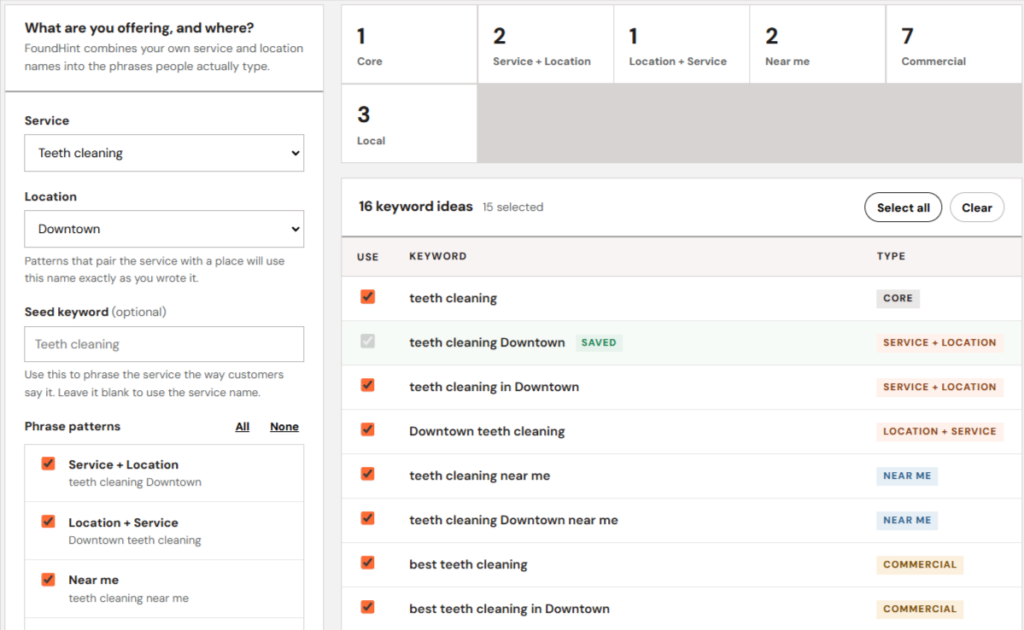
FoundHint, our Local SEO plugin for WordPress, doesn’t pull keyword volumes or replace your keyword research tool. It helps you measure and act on your keyword research: see where you actually rank for your target keywords in your target locations, then put those keywords to work across your Google Business Profile, from the same WordPress dashboard where you manage your service and location pages.
FoundHint Local SEO WordPress
Optimize your Google Business Profile without leaving WordPress
Connect your profile, compare it with your website and fix the gaps FoundHint finds.
- Business Profile audit and optimization
- Google Post scheduling
- Review management and replies
- Local rank tracking on a map grid
Track your target keywords with the FoundHint Ranking Grid
Keyword research tells you which keywords matter. The next question is: where do you actually rank for them? In local search, there’s no single answer. A
Dallas plumber can rank #2 for “emergency plumber” near their shop in Lakewood and #14 three miles away in Oak Lawn, because Google weighs the searcher’s location.
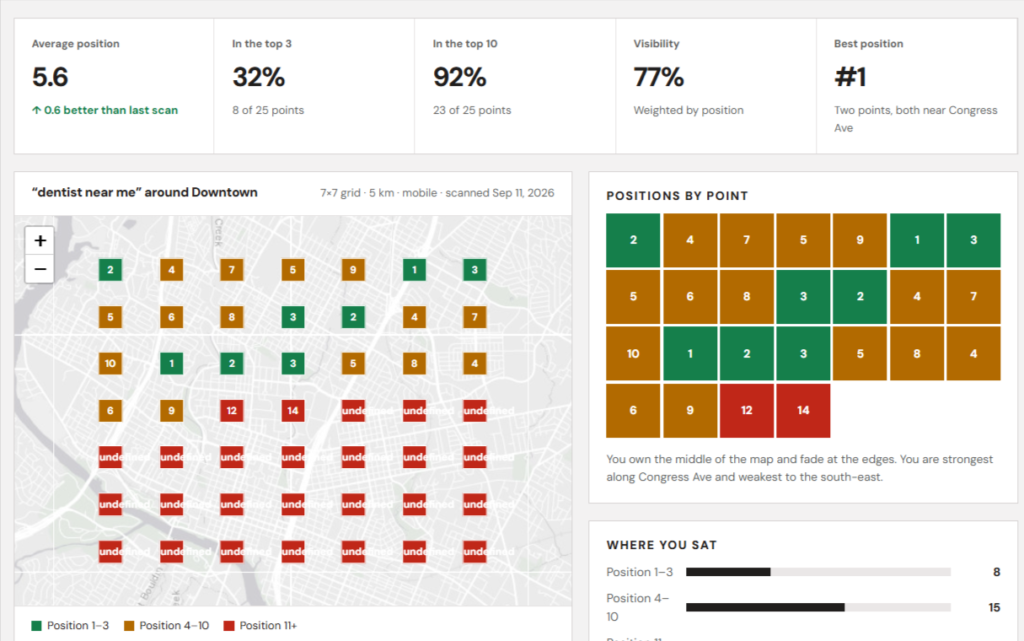
FoundHint’s Ranking Grid shows you that picture. Choose a target keyword and a target location, and FoundHint checks your ranking at points across a map grid around that location, so you see exactly where you’re visible and where you’re not.
- Ranking results by target keyword: track the high-priority keywords from your keyword map, such as “plumber Dallas,” “water heater repair,” and “emergency plumber”
- Ranking results by target location: see how rankings change across neighborhoods and nearby cities, not just one average number
- Find gaps on the map: spot the areas where competitors outrank you, then strengthen your location pages, Business Profile, and posts for those areas
- Measure progress: re-check after optimizing a service page or location page to see whether your visibility actually improved
- Compare locations: for multi-location businesses, see how each location ranks in its own local market
This closes the loop on Step 9 (prioritizing opportunities): keywords where you rank well near your location but drop off nearby are often the fastest wins.
Turn service keywords into Google Business Profile services and products
Your keyword research tells you exactly what customers call your services: “water heater repair,” not “thermal appliance maintenance.” With FoundHint, you can add those services as products on your Google Business Profile and sync WooCommerce products, so your Business Profile uses the same service language as your website pages.
Use keyword clusters to plan Google Business Profile posts
Informational and seasonal keywords make great post topics: “how to prevent frozen pipes in Dallas,” “AC tune-up before summer,” “storm damage roof inspection.” FoundHint lets you create Google Business Profile posts in WordPress, schedule them ahead, and link each one to the service page that targets that keyword cluster.
Manage every location’s profile from one place
If your research shows different priorities for Dallas and Plano, you can act on that. FoundHint lets you manage multiple Google Business Profile locations, including posts, hours, photos, and reviews, so each location’s profile reflects its own local market.
Keep business information consistent
Local keywords only help if Google trusts your business details. FoundHint’s local citation check helps you spot inconsistent name, address, and phone details across directories, so your keyword-targeted pages and profiles aren’t undermined by messy data (NAP Consistency for Local SEO).
Respond to reviews in your customers’ own words
Reviews are full of real customer language, and they’re a great source of new keyword ideas. FoundHint brings your Google reviews into WordPress so you can read them, reply, and set up personalized auto-replies, while noticing the phrases customers use to describe your services.
| Keyword research output | How FoundHint helps you act on it |
|---|---|
| Target keywords and locations | Track ranking results on a map with the Ranking Grid |
| Service keywords | Add services as products on your Google Business Profile; sync WooCommerce products |
| Informational and seasonal keywords | Create and schedule Google Business Profile posts linked to the right pages |
| Location-specific priorities | Manage multiple GBP locations from one WordPress dashboard |
| Customer language | Read and reply to reviews in WordPress, with personalized auto-replies |
| Consistent business data | Check local citations for NAP consistency |
Done your keyword research? Put it to work. Install FoundHint and bring your Google Business Profile in line with the keywords your customers actually use.
Common Local Keyword Research Mistakes
- Choosing keywords based only on search volume: a big number with weak intent rarely brings calls
- Ignoring local search intent: targeting an informational query with a sales page (or the reverse)
- Targeting irrelevant cities: cities you don’t serve, or are too far away to compete in
- Overusing city names in content: “our Dallas plumbers serve Dallas homes with Dallas plumbing” reads badly and helps nobody
- Creating thin location pages: the same page cloned 20 times with a different city name
- Targeting the same intent across multiple pages: pages competing with each other for one keyword
- Treating estimated search volume as exact local demand: small-market volumes are rough estimates, and many real searches show as “0” in tools
- Ignoring leads, calls, and conversions: rankings and traffic don’t pay the bills; qualified leads do
Local SEO Keyword Research Checklist
- Identify core services and products
- Understand what customers call them and what situation they’re in when searching
- List genuine target locations
- Collect seed keywords and variations
- Check GBP Performance and Search Console for keywords you already rank for
- Expand the list with research tools
- Separate explicit (city-named) and implicit keywords
- Classify search intent and check the live local results
- Review volume and competition estimates, and whether the local pack is winnable
- Group related keywords
- Map clusters to appropriate pages and your Google Business Profile
- Add conversational questions for AI search
- Prioritize commercial opportunities
- Track organic and map-grid rankings and conversions
- Review and update keyword targets every three to six months
Frequently Asked Questions
What is local SEO keyword research?
It’s the process of finding the searches people use to find nearby businesses and services, like “plumber Dallas” or “dentist near me,” and deciding which ones to target on which pages of your website and Google Business Profile.
How do you do keyword research for local SEO?
List your services and real service areas, build seed keywords, expand them with tools and Google suggestions, analyze search intent, review volume and competition, group keywords into clusters, map each cluster to one page, and prioritize the opportunities most likely to bring leads.
How important is keyword research for local SEO?
Very. It tells you what customers search for, which pages to build, and how to word your titles, headings, and Google Business Profile, so your local SEO effort targets searches that actually turn into customers.
What are the best tools for local SEO keyword research?
Google Keyword Planner, Google Search Console, Semrush, Ahrefs, Google autocomplete, Google Trends, and local rank trackers like BrightLocal. Each covers different data; none gives perfect local volume.
Is there a free keyword research tool for local SEO?
Yes: Google Keyword Planner, Google Search Console, Google Trends, and Google autocomplete are free and cover most basic local research.
How do you find keywords for a specific city?
Combine your services with the city and neighborhood names, set your keyword tool to that location, check Google autocomplete and related searches, and look at what local competitors target.
How many local keywords should a page target?
One primary topic per page, plus closely related variations and synonyms. A water heater repair page can rank for dozens of related searches, but it shouldn’t also try to target drain cleaning.
Should every city have its own location page?
Only cities you genuinely serve and can write unique, useful content about. A handful of strong location pages beats dozens of thin ones.
How do you find local keywords with low competition?
Look for long-tail and question-based keywords, neighborhood-level terms, specific services, and queries in Google Search Console where you already get impressions but don’t rank well yet.
Can AI tools help with local keyword research?
Yes, for brainstorming, grouping, and classifying keywords by intent. But verify volumes and intent with real keyword tools and actual Google results, because AI can guess wrong.
What’s the difference between explicit and implicit local keywords?
Explicit local keywords include a location (“dentist in Austin”). Implicit ones don’t (“dentist”), but Google still shows local results based on the searcher’s location. Implicit keywords often have more volume, and you can rank for them without stuffing city names into your pages.
Can you trust keyword difficulty scores for local keywords?
Only loosely. Most difficulty scores are based on national backlink data and don’t reflect local pack competition. Always check the live local results to judge how winnable a keyword really is.
Should I use “near me” in my content?
No. Google already uses the searcher’s location for “near me” searches. Focus on clear service relevance, location pages, and a strong Google Business Profile instead.
How do I track local keyword rankings?
Track organic rankings by city, track map rankings with a grid tool like FoundHint’s Ranking Grid to see your visibility across your service area, and connect rankings to calls and bookings.
Conclusion
Local SEO keyword research isn’t about finding the biggest numbers. It’s about finding the searches your real customers type, in the places you really serve, and building a clear page for each one. Start with your services and locations, expand with tools and real customer language, read the intent behind every keyword, group them into clusters, map each cluster to one page, and prioritize what brings calls and bookings, not just traffic.
Then revisit it. Search behavior changes with seasons, new services, and new competitors, so treat your keyword list as a living document and review it every few months alongside your Google Search Console data.
And when your research is done, measure it and put it to work. With FoundHint, you can track your target keywords across your target locations with the Ranking Grid, then carry your keyword plan into your Google Business Profile from WordPress: services and products, scheduled posts, multiple locations, reviews, and consistent business information, all from one dashboard.